Diary
Sleep, feeds, diapers and medicines in one tap.
Diary · Family · Crib camera
Log sleep, feeds and diapers in one tap. The whole family sees it right away. And the old phone in the drawer becomes the crib camera.
Beta version, through TestFlight, Apple's testing app.
Android: coming soon on Google Play.
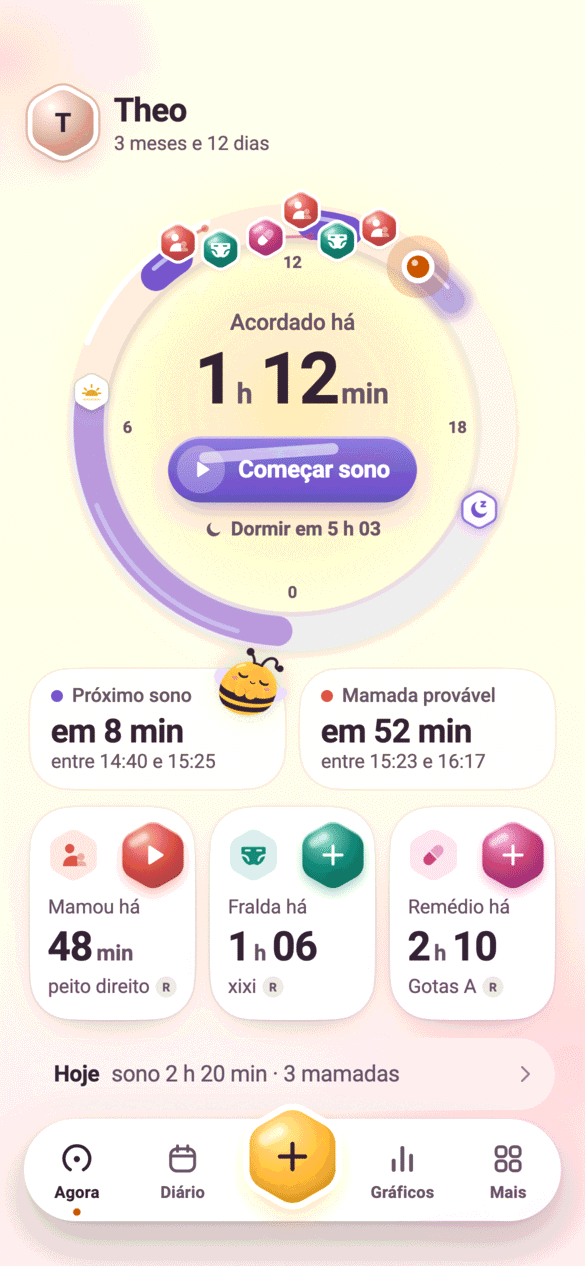

App screen · design image
What caring is really like
It's the same question all day long, and the answer lives in just one person's head.
A note on the fridge, a note on the phone, the family group chat. Everyone logs it their own way.
With Napbee:Fed 48 min ago
You plan the next nap in the dark, exhausted, on a hunch.
With Napbee:Slept 2 h 20 today
One parent knows one thing, the other something else, grandma a third. Whoever walks in knows nothing.
With Napbee:Changed 1 h 06 ago
The solution
No notes on the fridge, no baby monitor in every room, no paid app on the side.
Sleep, feeds, diapers and medicines in one tap.
Each on their own phone, all on the same day.
The old phone in the drawer becomes the camera.
The video goes straight between phones. Nothing recorded.

The diary
Sleep, feeds and diapers on the same dial, with “now” marked. At a glance you know how long the baby has been awake.
One tap on “Start sleep”. “Awake for” is always in view.
Breast (side and duration), bottle in ml or oz, solids. No math needed.
Wet, dirty or both. One tap and done.
Time and dose of each medicine, and a warning if the next dose comes before the interval.
The next nap from your baby's own data, never from “the average baby”. Not medical advice.
A candlelit Night appearance, dark and with no blue, so it won't dazzle you at 3 a.m.


App screens, design images.
As a family
You and whoever cares for the baby with you log it, each on your own phone, and see the same day. No more “did you feed the baby yet?” texts.
Crib camera
With the old phone in the drawer. It stays in the nursery, on the charger, with the app open. On your phone you see and hear the baby, live.

 Illustration
Mimi in the video is only an illustration.
On the charger, with the app open.
Check the words on both phones. A photographed QR code gets nobody in.
On a phone, a tablet or a computer. Remove a device's access with one tap.
Good to know first
The video goes from the crib phone to yours, directly and encrypted. Never through our servers. Never recorded.


App screens, design images. Mimi in the video is only an illustration.
On a computer
baby-monitor-and-tracker.
More › Baby monitor › Scan another device's code.
Check the words and approve with biometrics. It lasts 24 h; to end it sooner, revoke it in the app.
Only an Owner can approve. Approve only if you opened that page yourself, just now.

The math
Setting up a baby's routine often turns into a shopping cart. Here is the usual path, and what changes.
from about US$ 190 in the first year
from about US$ 80 to over US$ 300 per camera
from about US$ 30 to US$ 120 a year
PDFs, screenshots and spreadsheets: hours of your time
Example using only the lowest prices we found: 2 cameras and 1 year of an app, from about US$ 190 in the first year. With well-known brands it comes to much more.
US$ 0 in hardware
Free for the basics, no ads. An optional paid plan will come later.
Public price ranges from stores and official pages, checked on 20 Nov 2026. They change by store, region and promotion, and well-known brands sit at the top of the range. We do not compare products by name.
Coming soon
We plan to let an AI read the baby's records, only with your permission and only to read. No pasting spreadsheets: you would just ask, “how much did the baby sleep this week?”
Coming soon · not in the app yet
Today the app has no such integration, and we have not set a date or a plan for it. When it exists, the data you ask about goes to the AI provider you choose; that is different from the video, which always goes device to device. AI answers are not medical advice.
Getting started
Three steps. The crib is optional.
With your phone number and a code by SMS. No password, no e-mail.
And invite whoever cares for them with you, by code or QR.
A second phone becomes the crib camera.
Privacy
The crib video stays between your phones. Everything else, you see and control.
In Europe (Google Cloud, Belgium region).
The baby's records are protected by per-family access rules, but they are not end-to-end encrypted. End-to-end encryption covers video, audio and the connection. Read the Privacy Policy
No ads, ever. An optional paid plan will come later, for those who want more.
Before you try
Yes. To sign in, sync the diary and use the monitor: without internet the crib phone stops, for safety. The video itself goes over your home Wi-Fi, device to device.
Any phone that runs the app. It stays on the charger; on iPhone, with the app open on screen (iOS doesn't allow the camera in the background).
No. Video and audio never pass through our servers and are never recorded by us.
It is optional and off by default. With “Allow away from home” on, the app tries a direct connection over the internet. Since we don't use a relay server, it can fail on 4G and with some carriers.
Coming soon on Google Play. For now, testing is on iPhone, through TestFlight.
You send her an invite by code or QR, valid for 48 h. She installs the app and signs in with her phone number. On the free plan, a family has room for 2 people who log.
Not yet. It is in the plans: an AI assistant reading the records, with your permission and revocable. When it exists we will say so here and in the app.
No. The app does not monitor breathing, gives no medical alerts and never replaces adult supervision.
Their access ends immediately on the server. A video session that is already open ends within 15 min.
The button to delete the account and the family from the app is still being built. Once deleted, the family and its records are scheduled for deletion and are gone for good after 30 days.
From stores and official pages, checked on 20 Nov 2026. They are “from” ranges and vary by store, region and promotion.
The account's phone number, the baby's records the family chooses to keep and the list of monitor devices. The details are in the Privacy Policy.
At the next feed, one tap and it's logged. And the whole family sees it.
Beta version, through TestFlight, Apple's testing app. Android: coming soon on Google Play.
Already have the app? Watch on your computer.
App Store and TestFlight are trademarks of Apple Inc. Google Play is a trademark of Google LLC.
We use Google Analytics to count visits. No ads. Privacy Policy